Multiple Cards and Account Details
Adding and displaying multiple cards with their numbers and account details for easy copying and access.
Mobile app
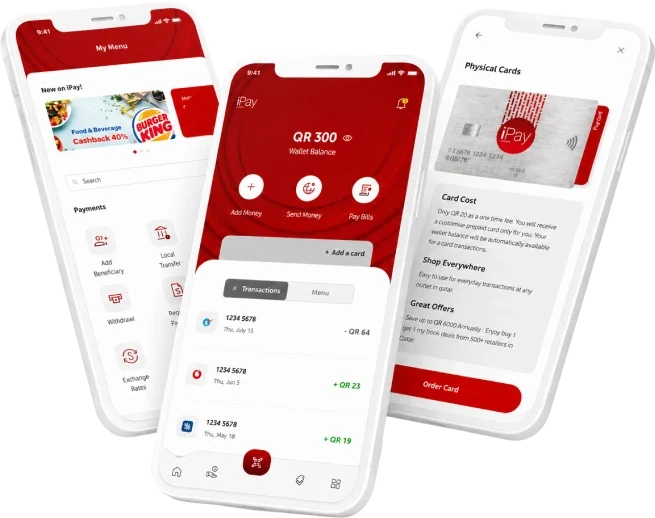
A digital wallet for everyday users to pay bills, send money, and split costs instantly.
The current design and user experience of iPay present challenges in usability and visual appeal. Users often face difficulties navigating the platform, with complex payment flows and unclear access to essential features such as transaction history and settings. Additionally, the outdated visual design fails to instill trust and engagement, impacting user satisfaction and retention. There is a need for a revamped solution that simplifies user flows, enhances accessibility, and upgrades the visual design to provide a modern, intuitive, and delightful experience for all users.
The iPay revamp focuses on simplifying user flows and enhancing visuals through heuristic evaluations, moodboards, best practices, competitor analysis, and mockups.
High-fidelity mockups showcase the redesigned interface with an intuitive layout, ensuring a modern, user-friendly, and engaging experience for iPay users.
Initiating with the user research to find the demographics of the target audience and getting insights through the interviews.
01 / Heuristics 1 to 4
02 / Heuristics 4 to 6
03 / Heuristics 6 to 9
Modern, minimal and intuitive mobile banking experience, with a focus on clarity, quick actions, and effortless money management.
Adding and displaying multiple cards with their numbers and account details for easy copying and access.
Multiple quick links and balance details with primary user actions.
A clean, compact balance section with all necessary actions to enhance usability.
Adding filters to transactions according to basic categories.
Card details and balance style for multiple cards.
Improving the visibility of transaction categories.
Visibility of multiple accounts and the approach for adding a new one.
01 / Competitor overview
02 / Competitor overview
03 / Competitor overview
04 / Competitor overview
01 / Wallet home
02 / Choose deposit method
03 / Enter amount to deposit
04 / Transaction in progress
05 / Transaction failed